Gain timely investment insights on:
By subscribing, you agree to receive research insights and marketing communications from us. You may unsubscribe at any time. See our Privacy Policy for details.
You may take a photo of this unique QR code using your mobile phone’s camera.
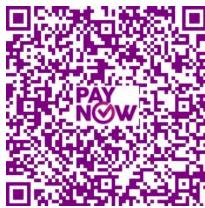
Log in to your bank’s mobile banking app and select QR Pay -> Select from Device
Select the photo of the QR code you have taken earlier.
Do ensure that you have allowed your bank’s mobile banking app to access to your mobile phone’s photo gallery.
Please click here for the step-by-step User Guide.
Note that this is done with UOB Mighty Mobile Banking app. Steps and user interface may differ slightly for other banks' mobile banking app.